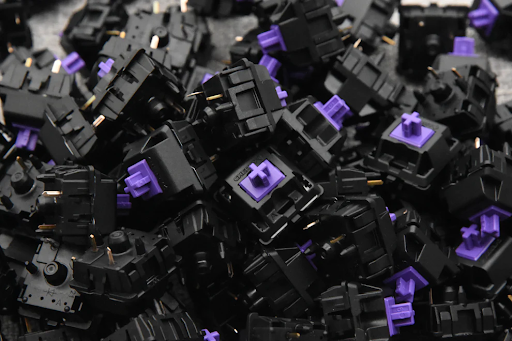
Keyboard Switches: A Complete Guide for Gamers and Typists
Whether you’re a gamer, programmer, or everyday typist, the keyboard is the primary tool for interacting with your computer. One of the most important aspects of a keyboard’s performance is its switches. Keyboard switches determine how keys feel, how fast you can type, and even the overall sound of your typing experience. Understanding the different types of switches, how they work, and which one fits your needs can enhance both productivity and enjoyment. In this guide, we explore the world of keyboard switches, their types, benefits, and how to choose the right one for your setup.
What Are Keyboard Switches?
Keyboard switches are the mechanical or electronic mechanisms beneath each keycap that register a keystroke. They are the core component that translates your finger press into an input signal on your computer. Switches come in various designs, offering different levels of tactile feedback, actuation force, and sound. While membrane keyboards rely on a soft rubber dome for key presses, mechanical keyboards utilize individual switches for each key, providing higher durability, precision, and customization.
How Do Mechanical Keyboard Switches Work?
Mechanical switches use a combination of a spring, stem, and housing to register key presses. When you press a key, the stem moves downward against a spring, eventually making contact with an electrical circuit to register the input. The design of the stem and spring determines the key’s feel, actuation force, and sound.
There are three main components in a mechanical switch:
· Stem: The part that moves when you press the key, determining the key travel and tactile feedback.
· Spring: Provides resistance and helps the key return to its original position.
· Housing: Encases the stem and spring, influencing sound and durability.
Switches can be linear, tactile, or clicky, each offering a unique typing experience. Linear switches provide smooth keypresses, tactile switches offer feedback when a key is activated, and clicky switches combine tactile feedback with an audible click. These variations allow users to select switches suited for gaming speed, typing comfort, or quiet operation. Real-world tests show that tactile switches can improve typing accuracy by 5-10% for office work, while gamers often prefer linear switches for rapid keypresses due to their minimal resistance.
What Are the Different Types of Keyboard Switches?
What Are Linear Switches?
Linear switches provide a smooth, consistent keystroke from top to bottom without tactile bumps or audible clicks. They are often favored by gamers because of their quick actuation and minimal resistance, allowing rapid key presses in fast-paced games. Popular examples include Cherry MX Red and Gateron Yellow switches.
What Are Tactile Switches?
Tactile switches provide noticeable feedback at the actuation point without a loud click. This feedback helps typists know exactly when a keypress has registered, reducing errors and finger fatigue. Examples include Cherry MX Brown and Keychron’s tactile variants. In office environments, tactile switches are preferred for quiet typing while maintaining feedback.
What Are Clicky Switches?
Clicky switches combine tactile feedback with an audible click sound, giving a satisfying typing experience. They are often used by typists who enjoy audible confirmation for every keystroke. Cherry MX Blue and Razer Green switches are common clicky options. However, the loud clicks may not be suitable for shared workspaces or quiet environments.
| Switch Type | Feedback | Noise Level | Best Use Case |
| Linear | Smooth | Low | Gaming |
| Tactile | Medium (bump) | Medium | Typing & Gaming |
| Clicky | High (bump + click) | High | Typing Enthusiasts |
How to Choose the Right Keyboard Switch for You?
Selecting the right keyboard switch depends on your primary use, typing style, and personal preference. Here are some factors to consider:
· Typing vs Gaming: Gamers often prefer linear switches for fast key presses, while tactile or clicky switches can benefit typists looking for feedback and accuracy.
· Noise Sensitivity: Consider your environment; clicky switches are loud, which may disrupt others, while linear switches are quieter.
· Actuation Force: Measured in grams, lighter switches (e.g., 45g) require less force, reducing finger fatigue. Heavier switches (e.g., 60-70g) provide more resistance and precision for typists.
· Hot-Swappable vs Fixed: Hot-swappable keyboards allow you to replace switches without soldering, offering flexibility for experimentation.
· Key Travel and Feel: Some users prefer shorter travel for fast input, while others enjoy longer travel for a classic typing feel.
It’s often useful to try a switch tester to experience different switch types before committing. Many users combine tactile or clicky switches for alphanumeric keys and linear switches for gaming-related keys to achieve a hybrid setup that balances feedback and speed.
What Are the Benefits and Drawbacks of Different Switch Types?
Each switch type has unique advantages and trade-offs. Linear switches are ideal for rapid presses but lack feedback, which may lead to accidental keypresses. Tactile switches provide confirmation and reduce errors but can feel slower for gaming. Clicky switches offer satisfying audio and feedback but may be disruptive in shared spaces.
Another consideration is durability. Mechanical switches often last between 50–100 million keystrokes, vastly outperforming membrane keyboards. Additionally, the choice of switch affects ergonomics; lighter switches reduce finger strain, while heavier switches can improve typing precision. Users who type extensively may prefer tactile switches for comfort, while competitive gamers often lean toward linear switches for minimal resistance and speed. Ultimately, the best switch balances performance, comfort, and noise based on your individual use scenario.
Conclusion
Keyboard switches are a crucial factor in typing experience, gaming performance, and overall keyboard satisfaction. Understanding the differences between linear, tactile, and clicky switches, as well as their benefits and drawbacks, helps users make informed decisions. Whether you prioritize speed, feedback, or quiet operation, selecting the right switch can enhance both productivity and enjoyment. Experimenting with switch testers or hot-swappable keyboards can provide a hands-on way to find the perfect fit for your setup.
FAQs
Are mechanical switches better than membrane switches?
Mechanical switches offer higher durability, precision, and a wider variety of tactile experiences compared to membrane switches, which rely on rubber domes and generally provide less feedback and shorter lifespan.
How long do keyboard switches typically last?
High-quality mechanical switches often last 50–100 million keystrokes, while membrane switches usually last 5–10 million keystrokes.
Can I replace my keyboard switches myself?
Yes, if your keyboard is hot-swappable, you can easily replace switches without soldering. Otherwise, soldering skills are required for fixed-switch keyboards.